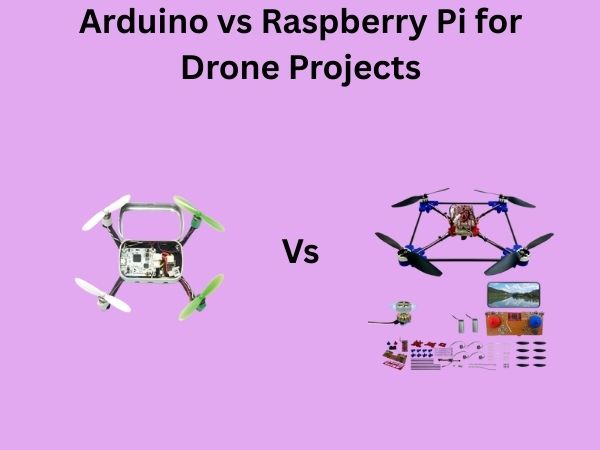
Arduino vs Raspberry Pi for Drone Projects: Which Is Better?
When you’re standing at the crossroads of drone development, wondering which microcontroller platform to choose, you’re asking one of the most important questions in the maker community. Should you go with Arduino or Raspberry Pi? It’s like choosing between a Swiss Army knife and a full-featured power drill—both are incredible tools, but they serve different purposes. Let me help you navigate this decision by breaking down everything you need to know.
Understanding the Core Differences Between Arduino and Raspberry Pi
Before we dive into the nitty-gritty comparison, let’s establish what we’re actually dealing with here. Many people think Arduino and Raspberry Pi are interchangeable, but that’s like saying a motorcycle and a car are the same because they both have wheels. They’re fundamentally different beasts.
What Exactly Is an Arduino?
Arduino is a microcontroller platform designed specifically for simple, real-time tasks. Think of it as a specialized worker that excels at one or two specific jobs but doesn’t want to be distracted by anything else. When you program Arduino, you’re essentially telling it to read sensors, make quick decisions, and control motors or LEDs. It’s been around since 2005 and has become the gold standard for hobbyists and beginners.
The beauty of Arduino lies in its simplicity. You write your code, upload it, and it runs repeatedly in a loop without needing an operating system. There’s no startup time, no waiting for the system to boot up. Your drone’s flight controller is ready to respond to sensor input in milliseconds.
What Is Raspberry Pi All About?
Raspberry Pi, on the other hand, is a full-fledged single-board computer that runs an operating system—typically Linux-based Raspbian. Imagine having an actual desktop computer shrunk down to the size of a credit card. It’s powerful, versatile, and capable of running multiple programs simultaneously. Raspberry Pi excels at tasks that require processing power, like image recognition, data logging, or running complex algorithms.
The tradeoff? Raspberry Pi takes time to boot up, consumes more power, and requires an operating system to manage its resources. It’s overkill if you just need to read a gyroscope, but it’s perfect if you want your drone to understand what it’s seeing.
Processing Power and Performance Comparison
Arduino’s Processing Capabilities
Most Arduino boards, like the Arduino Uno, run on an ATmega328P microcontroller clocked at 16 MHz. That might sound glacially slow compared to your laptop, but hear me out—it’s perfectly adequate for drone control. Your drone doesn’t need to process Netflix streams; it needs to read gyro data, calculate stabilization adjustments, and send signals to motors. All of that happens incredibly fast at 16 MHz.
The Arduino Mega and Arduino Due offer higher clock speeds (up to 84 MHz), giving you more headroom for complex calculations without sacrificing stability. When it comes to real-time performance, Arduino’s dedicated architecture actually beats general-purpose computers because there’s no operating system hogging resources in the background.
Raspberry Pi’s Processing Power
Raspberry Pi boards pack a serious punch. The latest Raspberry Pi 4 features a quad-core ARM processor running at 1.5 GHz to 2.3 GHz depending on the model. That’s roughly 100 times faster than Arduino in raw computational ability. If you need your drone to perform sophisticated tasks—like running OpenCV for computer vision or processing LiDAR data—Raspberry Pi steps up to the plate.
However, here’s the catch: that extra processing power comes with overhead. The operating system consumes CPU cycles, interrupt handling isn’t as predictable, and response times can fluctuate. For drone stabilization, consistency matters more than raw speed.
Real-Time Performance Matters
Picture this scenario: your drone’s gyroscope detects a sudden wind gust. With Arduino, the response happens within microseconds, every single time, with zero variation. With Raspberry Pi, that same task might take a few milliseconds, and the timing could vary depending on what else the system is doing. In drone flight, that microsecond difference adds up.
Memory and Storage: How Much Space Do You Really Need?
Arduino’s Memory Constraints
The Arduino Uno comes with 2 KB of RAM and 32 KB of flash memory for your program. That sounds embarrassingly small in today’s world, doesn’t it? But it’s actually plenty for drone flight control. Your stabilization algorithm doesn’t require megabytes of memory. You’re storing sensor readings and flight parameters, not downloading software libraries.
If you’re pushing the limits, Arduino Mega offers 8 KB of RAM and 256 KB of flash—still modest by modern standards, but enough for sophisticated autopilot systems. The constraint forces you to write efficient code, which is actually a good thing for a drone’s responsiveness and battery life.
Raspberry Pi’s Storage Advantage
Raspberry Pi runs on microSD cards ranging from 4 GB to 256 GB. You can store gigabytes of flight logs, camera footage, maps, and machine learning models. Want your drone to identify objects using AI? That neural network model needs storage space that Arduino simply can’t provide.
The downside? All that storage flexibility means you need to manage files, update the operating system, and handle data management. It’s more complexity if you only need basic drone control.
Programming Languages and Developer Experience
Arduino’s Simplified Approach
Arduino uses its own language, which is essentially a simplified version of C++. If you’ve never programmed before, Arduino’s straightforward syntax and extensive tutorials make it the perfect starting point. You learn concepts like digital I/O, PWM, and interrupts without drowning in complexity.
The Arduino IDE is lightweight and intuitive. Plug in your board, write your code, click upload, and you’re done. No installation nightmares, no dependency hell. Even if something goes wrong, the error messages are usually helpful and the community instantly recognizes common mistakes.
Raspberry Pi’s Programming Flexibility
Raspberry Pi supports Python, C++, JavaScript, Java, and virtually any language you can think of. Python has become the go-to choice for Raspberry Pi projects because of its readability and massive library ecosystem. Want to use machine learning? NumPy and TensorFlow are at your fingertips. Need image processing? OpenCV integration is straightforward.
The tradeoff is learning curve. Setting up Python environments, managing package dependencies, and debugging operating system issues requires more experience. It’s more powerful but demands more knowledge.

Power Consumption and Battery Life Implications
Arduino’s Energy Efficiency
Here’s where Arduino really shines for drones. An Arduino Uno consumes roughly 50 mA at 5V under normal operation. Run it on battery, and you’re looking at incredibly long operational times. Some Arduino variants can enter sleep modes consuming just microamps, perfect for drones that need to wait on standby.
Why does Arduino use so little power? It’s not running an operating system. There’s no kernel managing memory, no background services updating, no screen driver consuming electricity. Just pure, lean code doing exactly what you tell it to do.
Raspberry Pi’s Power Demands
A Raspberry Pi 4 draws 600 mA to 1 A even at idle, and under full load can spike to 2 A or more. That’s 10 to 20 times the current of Arduino. For a battery-powered drone, that’s significant. You’d need a massive battery just to power the brain, leaving less capacity for motors and sensors.
Raspberry Pi does have low-power modes, but they’re not as aggressive as Arduino’s options. The operating system still needs to run, and that has inherent power costs.
Battery Life Comparison
Imagine you have a 2,000 mAh battery. With Arduino consuming 50 mA, you get 40 hours of flight time on the controller alone. With Raspberry Pi consuming 800 mA, that same battery gives you 2.5 hours. This dramatically affects what kind of drones you can build. Arduino is perfect for small racing drones or experimental designs where weight and power are critical. Raspberry Pi works better for larger platforms where battery capacity isn’t as constrained.
Size and Weight: Critical Factors for Flight
Arduino’s Compact Advantage
The Arduino Uno measures roughly 7 by 5 centimeters. Many smaller variants like the Arduino Nano (4.3 by 1.8 cm) are barely larger than a postage stamp. For drones where every gram counts, this size advantage is significant. Your controller weighs mere grams, leaving precious payload capacity for cameras, sensors, and batteries.
Raspberry Pi’s Physical Footprint
A Raspberry Pi 4 is roughly 8.6 by 5.6 centimeters—similar to Arduino’s footprint but not as modular. However, you’ll typically need additional components: a power supply module, a cooling heatsink, and protective enclosure. The total weight balloons compared to Arduino. For micro-drones under 250 grams, Raspberry Pi becomes problematic.
Cost Analysis for Drone Project Development
Arduino Pricing Structure
An Arduino Uno costs about $20 to $30 if you buy an official board, or $5 to $10 for compatible clones. Specialty boards like Arduino Mega run slightly higher. The low cost means you can experiment freely, make mistakes, and learn without major financial investment. Many drone enthusiasts start with multiple Arduino boards to develop and test before committing to final designs.
Raspberry Pi’s Investment Requirements
A Raspberry Pi 4 board itself costs $35 to $75 depending on RAM configuration. But that’s just the beginning. You’ll need a quality power supply ($10 to $20), microSD card ($10 to $30), protective case ($10 to $20), and potentially a cooling solution ($5 to $15). Your total initial investment easily exceeds $100, often approaching $200 for a complete development setup.
Overall Project Costs
For simple drone control, Arduino’s lower cost is undeniable. For complex systems requiring advanced processing, Raspberry Pi’s investment often proves worthwhile because you get capabilities that would otherwise require expensive specialized hardware. Consider your project scope before deciding based purely on component cost.
Sensor Integration and Connectivity Options
Arduino’s Sensor Ecosystem
Arduino supports digital and analog sensors through its GPIO pins and analog inputs. Want to connect a gyroscope via I2C? Done. Need to read analog pressure sensors? Just use the analog pins. The simplicity here is beautiful. Most drone sensors like MPU6050 IMUs, barometric pressure sensors, and magnetometers have Arduino libraries available.
For wireless connectivity, Arduino can work with Bluetooth modules, WiFi shields, and even LoRa modules with appropriate add-ons. You have flexibility without complexity.
Raspberry Pi’s Connectivity Advantages
Raspberry Pi 4 includes built-in WiFi and Bluetooth, eliminating the need for additional modules. You can SSH into your drone remotely, stream video in real-time, and update software wirelessly. GPIO pins still exist for sensors, and you can run multiple communication protocols simultaneously.
However, managing all that connectivity requires more software overhead. Arduino’s simpler approach means fewer things to debug when something goes wrong.
Real-World Drone Project Examples
When Arduino Is Your Perfect Match
You should choose Arduino for racing drones, micro-quadcopters, autonomous line-following drones, or any project emphasizing lightweight, long-flight-time designs. Racing drone pilots absolutely depend on Arduino-based flight controllers because response time is paramount. The Crazyflie micro-drone famously uses an STM32 microcontroller—essentially the same philosophy as Arduino.
DIY drone enthusiasts building fixed-wing aircraft for agricultural monitoring often use Arduino for stability control because the simplicity ensures reliability. Once you upload your flight routine, it runs consistently without operating system surprises.
When Raspberry Pi Becomes Essential
Choose Raspberry Pi when your drone needs computer vision, autonomous navigation using complex algorithms, or real-time video streaming. Professional surveying drones often run Raspberry Pi alongside stabilization microcontrollers. The Pi handles image processing while Arduino manages flight control—best of both worlds.
Research drones collecting environmental data use Raspberry Pi to log gigabytes of sensor information, process data on-board, and transmit only relevant insights to base stations. Machine learning models identifying plant species or detecting forest fires run on Raspberry Pi’s processing power.
Community Support and Available Resources
Arduino’s Massive Community
Arduino has been around longer and has perhaps the largest maker community on the planet. Search any problem, and you’ll find multiple Stack Overflow answers, YouTube tutorials, and GitHub repositories. The Arduino forums are incredibly helpful, and beginners rarely get stuck for long. Educational institutions teach Arduino in schools, meaning countless tutorials exist at beginner-friendly levels.
Raspberry Pi’s Growing Ecosystem
Raspberry Pi’s community is nearly as large and growing rapidly. The official documentation is excellent, and you’ll find tutorials for virtually any project imaginable. However, Raspberry Pi tutorials often assume more programming knowledge than Arduino guides do. The learning curve is steeper, but the resources exist.
Drone-Specific Resources
If you’re specifically building drones, communities like DroneForums and Ardupilot have extensive documentation for both platforms. Ardupilot, an open-source autopilot system, supports Arduino-based boards and can run on Raspberry Pi. This flexibility means you’re not locked into one platform—many professional drones combine both.
Making Your Final Decision: A Decision Framework
Choose Arduino If You Want
- Maximum battery life and minimal power consumption
- Instant response times and predictable real-time performance
- Simplicity and ease of learning
- Small, lightweight designs
- Lower initial cost
- Reliable, stable operation without worrying about OS complexity
Choose Raspberry Pi If You Need
- Advanced image processing or computer vision
- Real-time video streaming to ground stations
- Machine learning and AI capabilities
- Complex autonomous navigation algorithms
- High-capacity data logging and analysis
- Built-in WiFi and Bluetooth connectivity
- Support for multiple simultaneous tasks
The Hybrid Approach: Best of Both Worlds
Here’s the secret that professional drone developers know: you don’t have to choose. Many sophisticated drones use both. Arduino or a